
P4RS3LT0NGV3
P4RS3LT0NGV3: The translator that shows what AI filters fail to read
A text translator that rewrites the same words in hundreds of codes, ciphers and alphabets. It shows why checking what an AI reads is harder than it sounds.
What this means for you
You already know that the same sentence can be written more than one way. “Hello” can be spelled backward, tapped out in Morse code, shifted three letters along the alphabet the way Julius Caesar did it, or written in letters borrowed from another script that happen to look the same. The meaning has not changed. Only the costume has.
People are good at a few of these and hopeless at most. An AI language model is different. It has read a very large share of the public internet, including every explanation of every code ever posted there. Hand it a sentence in a fairly obscure encoding and it can often read it straight off.
That creates a gap. Many of the safety checks placed around AI systems work by reading the text that goes in and comes out, looking for things that should be stopped. If the check is looking for a word, and the word arrives in a costume the check does not recognize but the model does, the check sees nothing and the model sees everything.
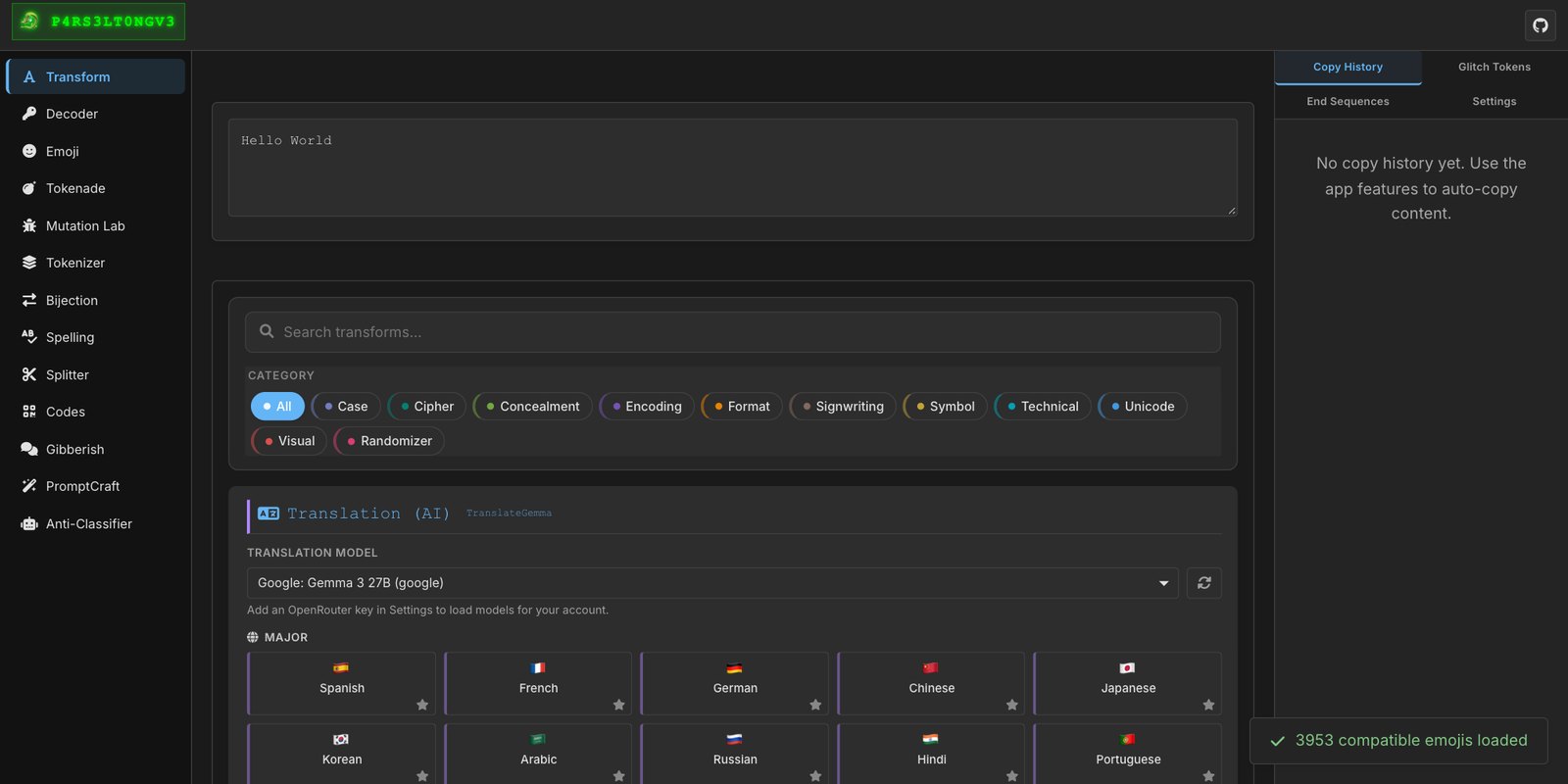
P4RS3LT0NGV3 is a tool for exploring that gap. It is a universal text translator with 222 built-in transformations. Type a sentence and it will show you the same sentence as Base64, as binary, as a dozen classic ciphers, as upside-down text, as emoji, as characters that take up no visible space at all. It also runs in reverse: paste in something unreadable and its decoder tries to work out what it is and turn it back.

Who uses it and why
The main audience is people who test AI systems for a living. If you are responsible for an AI product, you need to know whether your safeguards hold when the input stops looking like plain English. The only way to find out is to try, with a wide range of encodings, before someone else does. This tool puts that range in one place.
It is also useful to people on the receiving end. If you find a strange string of characters in an email, a document or a web page, the decoder can tell you what it says. And it is a good teaching toy. Seeing your own name pass through twenty ciphers in a second makes a point about codes that a textbook takes a chapter to make.
How to use it
The project is free on GitHub at the link above, and you can read everything there without an account. The quickest way to try it is the hosted version at elder-plinius.github.io/P4RS3LT0NGV3, which opens in a web browser with nothing to install. If you would rather run your own copy, you download the project, run one build step, and open a file in your browser. After that it works on your own machine with no connection needed for the core features.
Once it is open, the Transform tab is the place to start. Type any sentence and click through the categories. Then copy one of the results into the Decoder tab and watch it find its way back to what you wrote. A few extra features use outside AI models and need a separate key from a service called OpenRouter. You can ignore those and lose nothing important.
The lesson the tool teaches is worth taking away even if you never open it. A filter that reads text is only as good as the number of ways it knows how to read. The model behind it usually knows more.
What it is
P4RS3LT0NGV3 (version 4.0) is a browser-based text transformation and steganography workbench. It bundles 222 reversible and one-way text transforms, a universal decoder, tokenizer inspection, and a set of mutation tools, in a static site that runs locally. Core functions make no network calls. A small number of tabs call models through OpenRouter and need a user-supplied key.
The transform set
Transforms are organized in the same categories in the UI and in the source tree under src/transformers/:
- Encoding. Base32 through Base122, hex, binary, URL and HTML entities, Ascii85, uuencode, EBCDIC and others.
- Cipher. Caesar and the ROT family, Vigenère, Playfair, Atbash, Affine, Hill, rail fence and columnar transposition, among roughly forty.
- Concealment. Zero-width and whitespace steganography, invisible text in the Unicode Tags block, homoglyph substitution, acrostics and null ciphers.
- Unicode, Symbol and Visual. Styled alphabets, alternative scripts, flipped and mirrored text.
- Case, Format and Technical. Structural rewrites: casing, shuffling, splitting, stripping.
Why this is an attack surface
A safeguard that inspects text operates on some representation of it: raw characters, a normalized string, or tokens. A model operates on tokens and on everything it learned about how text can be encoded. When those two readers disagree about what a string says, there is a gap. Three mechanisms account for most of it.
- Learned decoding. Large models can read common encodings and many ciphers without being told which one is in use. A keyword or classifier check that only sees the encoded form has nothing to match.
- Invisible carriers. Variation selectors attached to an emoji, zero-width characters, and Tags-block characters do not render. A human reviewer sees a clean string. Whether a model sees the payload depends on its tokenizer.
- Look-alikes. Homoglyphs make two strings identical to the eye and different to an exact-match filter.
None of these techniques is new. What the tool adds is coverage: one place to generate the whole family and run it against a system under test.

The working tabs
- Transform. Apply any of the 222 transforms, with per-transform options.
- Decoder. Guesses the encoding of pasted text and falls back through other decoders if the first guess fails.
- Emoji. Encodes text into variation selectors on a carrier emoji, with configurable bit order.
- Tokenizer. Shows how a string splits under UTF-8 bytes, words, or GPT BPE vocabularies (cl100k, o200k, p50k, r50k). This is the tab that makes the reader-disagreement visible.
- Mutation Lab and Splitter. Generate many variants of one input, or split it by size, word, sentence, pattern or token count, for fuzz-style testing.
- Bijection, Spelling Alphabets, Gibberish, Codes. Custom character mappings, phonetic alphabets, and QR and barcode generation and reading.
- AI Translation, PromptCraft, Anti-Classifier. Model-assisted rewriting through OpenRouter. These are the explicitly adversarial tabs, built for evaluating classifiers and filters, and they are optional.
The defensive reading: inspect what the model will actually receive. That means normalizing Unicode, stripping non-rendering characters, and decoding common encodings before the check runs, then testing that pipeline against the full transform set rather than a handful of samples.
$ npm run build
$ open dist/index.html # or: npm start
Scope and use
| Transforms, decoder, steganography (offline) | stable |
| Tokenizer views (GPT BPE vocabularies) | stable |
| Model-assisted tabs | needs OpenRouter key |
The tokenizer view covers OpenAI vocabularies only, so results for other model families have to be confirmed against the model itself. A hosted build runs at elder-plinius.github.io/P4RS3LT0NGV3. The project also ships an agent CLI for scripted use. Licensed AGPL-3.0. The README lists education, creative writing and security research as intended uses. In a security context that means systems you own or are authorized to test.