
AutoTemp
AutoTemp: The tool that tunes an AI’s creativity by testing it
Every AI model has a dial that sets how predictable or how adventurous it is. This tool tries several settings at once and keeps the best answer.
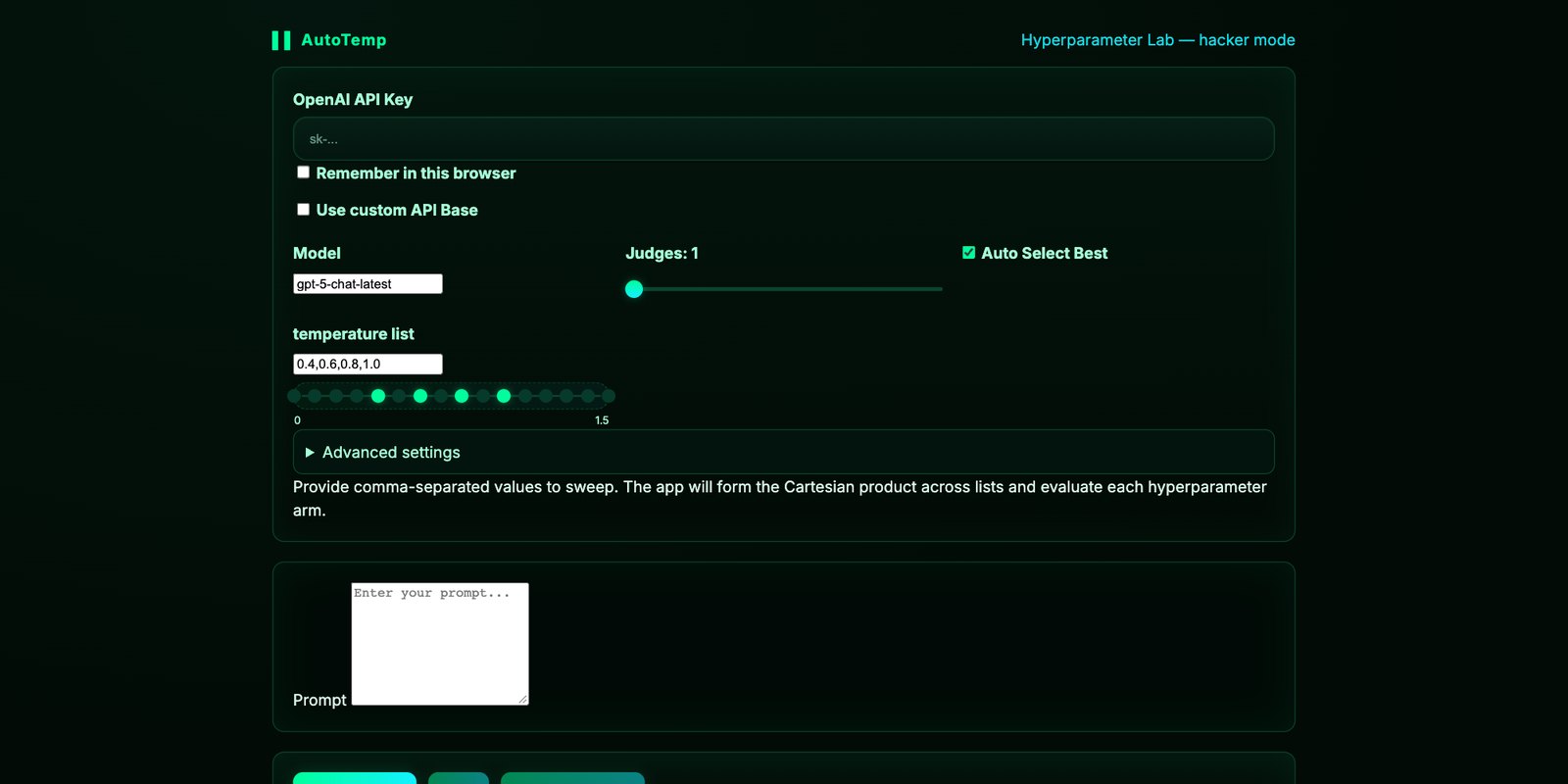
What this means for you
When an AI model writes, it chooses one word at a time. At each step it has a ranked list of words that could plausibly come next. Whether it takes the top choice every time, or sometimes reaches further down the list, is controlled by a single setting. The setting is called temperature.
At a low temperature the model plays it safe. It picks the most likely word, again and again. The result is steady, consistent and a little flat. At a high temperature it takes more chances. The result can be fresher and more surprising, and it can also wander off or stop making sense. Ask the same question twice at a high setting and you may get two quite different answers.
Most people never see this dial. The chat apps set it for you and do not mention it. People who build things with AI do see it, and they face a small, constant annoyance: the right setting depends on the job. A legal summary wants a cool, careful temperature. A list of names for a new bakery wants a warmer one. There is no single correct number, so in practice people guess, look at the result, and guess again.
AutoTemp does the second thing. You give it one request. It sends that request to the model several times, each at a different temperature, all at once. Then it asks the AI to act as a panel of judges, scoring every answer on things like how relevant it is, how clear, how useful and how creative. The answer with the best score is the one you get.
Why a panel of judges
A single judge has moods. Ask one AI judge to score an answer and the score can swing for no good reason. AutoTemp runs several independent judges and averages them, the same way a diving competition uses a row of scorecards. It is a small design choice that makes the result steadier.
There is also a smarter mode for when you want to spend fewer tries. Instead of testing every temperature equally, it starts by sampling each one, notices which are doing well, and gives those more attempts while still checking the others occasionally in case it was wrong about them. It is the strategy a sensible person uses with a row of slot machines, and it has a name, which is covered on the technical side.
The wider point is modest and worth having. An AI’s answer is one draw from many possible answers. A setting you never see shapes which draw you get. Knowing the dial exists makes you a better reader of anything a model tells you: if an answer matters, ask again.
How to use it
AutoTemp is free on GitHub at the link above, and you can read how it works without an account. To run it you need two things that put it a step beyond casual use. One is a little comfort with installing software. The other is a paid key from OpenAI, which is what lets the tool send requests to the model on your behalf. Each test uses that key several times over, once per temperature and again for the judges, so it costs more than a single question would.
If you have both, there are two ways in. The project has a simple web page version at elder-plinius.github.io/AutoTemp: you paste in your key, type a request, list the temperatures you want to compare, and press run. The key stays in your own browser. Or you can download it and run it on your computer, which opens the same kind of form. Either way you see every answer side by side with its scores, which is the instructive part.
What it is
AutoTemp is a Python tool that selects a sampling temperature empirically. It generates outputs for one prompt at several temperatures, scores them with a panel of model judges, and returns the best. It ships with a Gradio UI, a static browser version suitable for GitHub Pages, and a benchmarking interface for running the procedure over a dataset.
Background: what temperature does
A language model outputs a score (logit) for every token in its vocabulary. Those scores are divided by the temperature T and passed through a softmax to give a probability distribution, from which the next token is sampled. As T approaches 0 the distribution collapses onto the highest-scoring token and output becomes near-deterministic. At T=1 the model samples from its learned distribution unchanged. Above 1 the distribution flattens and low-probability tokens are chosen more often. AutoTemp also exposes top-p, which truncates the distribution to the smallest set of tokens whose cumulative probability reaches p.
Standard mode
- The prompt is sent once per temperature in a user-supplied list, concurrently, with a configurable worker count.
- Each output is scored by N independent judge calls (default 3) against a structured rubric: relevance, clarity, utility, creativity, coherence, safety and an overall score.
- Scores are averaged across judges. Outputs are ranked by mean overall score.
- With auto-select on, the top output is returned. With it off, all outputs and scores are shown for manual choice.
The multi-judge design addresses a known weakness of model-graded evaluation: a single judge call is itself a sample and carries variance. Averaging several reduces it. It does not remove shared bias, since all judges are the same model.
Advanced mode: UCB1
Advanced mode treats each temperature as an arm of a multi-armed bandit. After pulling each arm once, it repeatedly selects the arm with the highest upper confidence bound: the arm’s mean score so far plus an exploration bonus that grows with total rounds and shrinks with the number of times that arm has been tried.
The coefficient c is user-set. Higher values favor exploration. The practical effect is that budget concentrates on temperatures that are scoring well while under-sampled ones still get revisited. For a fixed number of generations this is more sample-efficient than evaluating every temperature uniformly, and the README notes the benefit is greatest on longer prompts, where each generation costs more.
Benchmarking
The benchmark() method takes a dataset of prompt and reference pairs and returns summary statistics: mean overall score with a bootstrap confidence interval, token usage, and estimated cost per model. If the optional packages are installed it also reports BLEU, ROUGE and BERTScore against the references, and falls back gracefully if they are not. Item-level results can be written to CSV.
agent.benchmark(dataset=data, temperature_string="0.4,0.7,1.0",
top_p=0.9, advanced=True, rounds=8, csv_path="results.csv")
The underlying idea generalizes beyond temperature. Any generation parameter can be chosen the same way: sample candidates, grade them with a panel, and allocate further budget by a bandit rule. Temperature is the simplest case to show it on.
Scope
| Standard multi-temperature mode | stable |
| UCB1 advanced mode | stable |
| Dataset benchmarking with CIs | stable |
| Reference metrics (BLEU, ROUGE, BERTScore) | optional install |
| Providers other than OpenAI | not built in |
Three limits are worth stating. The tool is written against OpenAI’s API and its examples name GPT-3.5 and GPT-4, so other providers need adapting. The judge is the same model family as the generator, which can favor that model’s own style. And cost scales with temperatures × judges, or with rounds × judges in advanced mode. The repository lists no license at the time of capture.
How to use it
$ cd AutoTemp && pip install -r requirements.txt
$ python autotemp.py # opens the Gradio UI
Set OPENAI_API_KEY in a local .env file first, and keep that file out of version control. The static version in docs/, hosted at elder-plinius.github.io/AutoTemp, runs entirely in the browser with a key the user pastes in.